Oracle: Parametrizing a view using a context

There are several ways to create parametrized view in Oracle. In this blog I’ll show you how to do that using a context. Assume you want to have a view that depends on some where condition:

select * from emp where deptno = ?

The deptno is known at the run time

You can define a context (or namespace) and define an attribute „deptno“ that holds the value of deptno at runtime. The context is like a container for attribute value pairs. The attribute can be defined using „dbms_session.set_context(context_name,attr,value)

To create the context (you should have the system privilege create any context) :

create context mycontext using mypackage accessed globally;


Note that the context is associated with a package. This is for security reasons, Oracle only allows to execute the dbms_session.set_context from within the package associated to the context. Furthermore the package does not have to be present at the point when the context is created.

create or replace package mypackage as
    procedure  def_attr_in_context(attr_nam in varchar2, attr_val in varchar2);
end mypackage;
/

create or replace package body mypackage as
    procedure def_attr_in_context(attr_nam in varchar2, attr_val in varchar2) is
    begin
        dbms_session.set_context('mycontext', attr_nam, attr_val);
    end def_attr_in_context;
end mypackage;

Defining the parametrized view with the where condition deptno = SYS_CONTEXT(‚mycontext‘,’deptno‘)

CREATE OR REPLACE VIEW vw_parametrized_view AS
SELECT * FROM emp WHERE deptno = SYS_CONTEXT('mycontext','deptno')
SELECT * FROM vw_parametrized_view

no rows selected

After setting the defining (setting) the attribute deptno

BEGIN
  mypackage.def_attr_in_context('deptno','20');
END;
SELECT * FROM vw_parametrized_view

7369 SMITH CLERK 7902 17.12.1980 800,00 20
7566 JONES MANAGER 7839 02.04.1981 2975,00 20
7788 SCOTT ANALYST 7566 19.04.1987 3000,00 20
7876 ADAMS CLERK 7788 23.05.1987 1100,00 20
7902 FORD ANALYST 7566 03.12.1981 3000,00 20

Retrieving the column values after DML Statement in Oracle database using Returning Clause

Primary keys play an important role in the database world. Based on them you can clearly identify a record. Most of the time, a primary key is defined as a number, which is filled via a sequence. This can be done automatically in a trigger:

--create a test table
create table TBL_TEST_SEQ
(
  id   NUMBER PRIMARY KEY,
  text VARCHAR2(255)
);
--create a sequence for the PK
create sequence MY_SEQ
minvalue 1
maxvalue 9999999999999999999999999999
start with 1
increment by 1;
-- create the trigger to fill the PK
create or replace trigger tri_tbl_test_seq   before insert  on  TBL_TEST_SEQ 
for each row
begin
  :new.id := my_seq.nextval;
end tri_tbl_test_seq;

Since Oracle 12.1 you do not need to explicitly create a sequence and the trigger. All you have to do is define the Primary Key column with the clause generated as identity in the table DDL (This option has existed for long time in MySQL).

create table TBL_TEST_SEQ
(
  id number generated always as identity,
  text varchar2(255)
)

With the following query you can see, that oracle has automatically created a sequence to fill the primary key:

select * from user_tab_identity_cols where table_name = 'TBL_TEST_IDENTITY'

After an insert, the column is filled implicitly. To still get the generated id, Oracle offers the „returnuning into“ clause:

declare
  v_id number;
begin
  insert into TBL_TEST_SEQ (text) values ('hello world') returning id into v_id;
  dbms_output.put_line(v_id);
end;

This is just one use case. In general you can retrieve all columns of the table:

 
drop table tbl_test purge;
-- create a table tbl_test
create table tbl_test
(
  id number generated always as identity,
  text varchar2(255),
  text2 varchar2(255) default 'text2 default'
);

declare
  v_txt varchar2(255);
begin
  insert into tbl_test(text) values ('hello world') returning text2 into v_txt;
  dbms_output.put_line('Output: ' || v_txt);
end;

Output: text2 default

Another interesting use case is after a delete or update statement:

declare
  v_txt varchar2(255);
begin
  delete from tbl_test where id = 1 returning text into v_txt;
  dbms_output.put_line(v_txt);
end;

If multiple records are affected by insert or update, you can retrieve the column values into collection:

eclare
  v_txts sys.odcivarchar2list ;
begin
  delete from tbl_test returning text bulk collect into v_txts;
  for i in 1..v_txts.count loop
    dbms_output.put_line(v_txts(i));
  end loop;
end;

Returning bulk collect into for Insert Statement:

declare
  v_ids sys.odcinumberlist;
begin
  forall i in 1..10
    insert into tbl_test (text) values( 'hello welt ') 
    returning id bulk collect into v_ids;
  for i in 1..v_ids.count loop
    dbms_output.put_line(v_ids(i));
  end loop;
end;

But what I miss is when using „insert + select from„. It seems that something like this is not implemented for some reason. Of course, there are other restrictions. For example, this does not work with parallel processing.

ORA-22288: file or LOB operation FILEOPEN failed soft link in path

On a 12c database when trying to load a file as a CLOB, I got the following error:

ORA-22288: file or LOB operation FILEOPEN failed
soft link in path

As if oracle checks if there is a soft link in the path of a directory! Since when does Oracle do that and why?

Here is an example to reproduce this on 12.2 version.

Let’s create a soft link:

[oracle@kirux ~]$ cd
[oracle@kirux ~]$ ln -s /tmp softlink
[oracle@kirux ~]$ ls -ltr
lrwxrwxrwx. 1 oracle oinstall          4 Aug  6 20:52 softlink -> /tmp

let’s create a database directory:

create or replace directory dir_with_softlink 
as '/home/oracle/softlink'

let’s create a file „file.txt“ in /home/oracle/softlink

[oracle@kirux ~]$ cat /tmp/file.txt
line1 test
line2 test2
[oracle@kirux ~]$

Following PL / SQL block to load the file into a CLOB:

declare
 l_bfile  BFILE;
  l_clob   CLOB;
  l_dest_offset   INTEGER := 1;
  l_src_offset    INTEGER := 1;
  l_bfile_csid    NUMBER  := 0;
  l_lang_context  INTEGER := 0;
  l_warning       INTEGER := 0;
begin
  l_bfile := BFILENAME('DIR_WITH_SOFTLINK', 'file.txt');
  DBMS_LOB.fileopen(l_bfile, DBMS_LOB.file_readonly);
  dbms_output.put_line('file opned');
  DBMS_LOB.loadclobfromfile (
    dest_lob      => l_clob,
    src_bfile     => l_bfile,
    amount        => DBMS_LOB.lobmaxsize,
    dest_offset   => l_dest_offset,
    src_offset    => l_src_offset,
    bfile_csid    => l_bfile_csid ,
    lang_context  => l_lang_context,
    warning       => l_warning);
  DBMS_LOB.fileclose(l_bfile);
exception 
  when others then
    dbms_output.put_line(sqlerrm);
end;

This error occurs when the above block is executed :

ORA-22288: file or LOB operation FILEOPEN failed
soft link in path

When trying to load the file as an external table it works:

create table
   ext_tbl_softlink ( msg varchar2(1024) )
organization external (
   type oracle_loader
   default directory dir_with_softlink
   access parameters (
      records delimited by newline
   )
   location('file.txt')
)
reject limit 100000

select * from ext_tbl_softlink -- this works


It appears that the check only affects the function DBMS_LOB.fileopen

To solve (go around) the problem I used the following undocumented parameter. (The instance should be restarted):

alter system set "_disable_directory_link_check" = true scope=spfile;
And
ALTER SYSTEM SET "_kolfuseslf" = TRUE SCOPE=SPFILE;

Note: On 11.2.0.4 it doesn’t matter whether there is a soft link in the path. It looks like this check was added in the version 12c.

Oracle Performance issues by using sequence in parallel high insert DML

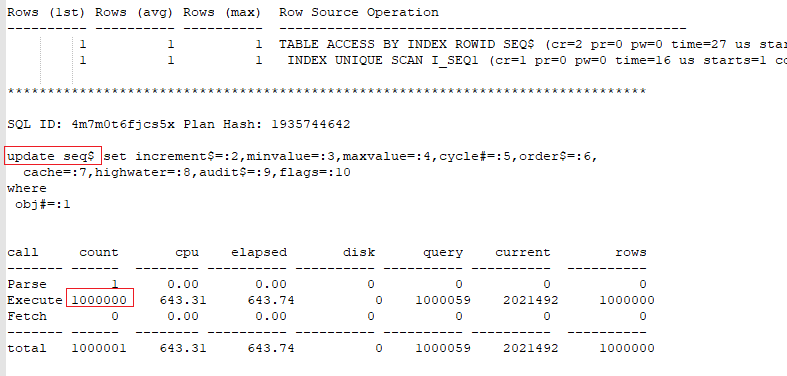
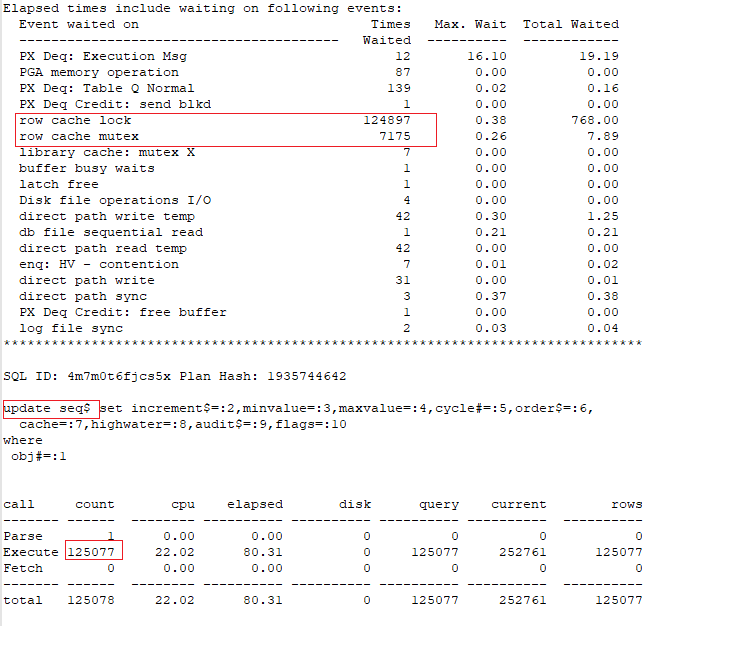
Sequences are good choice to generate unique integers for populating primary key and foreign key columns. By using them it is guaranteed that two sessions do not pull the same value. Ensuring this could have a big price in terms of performance. Indeed a sequence is just a row in the seq$ table and every time a session tries to get the next value of the sequence, it should increment the highwater value. This means updating highwater column for the row of the sequence in the seq$ table. For that, the session needs to request a row lock. In parallel processing, this leads to poor performance.
But also in serial processing (Even if the session may only request the lock once for the whole work), the act to update the seq$ table for each used value of the sequence is very expensive. Therefore you should cache the sequence.

Cache specifies how many sequence numbers to preallocate and keep in memory.
Only when all values from the cache are used, the table seq$ is updated. This means the larger is the cache the fewer updates on the seq$ table take place. So if you want to insert millions of rows the cache should be at least 1000.
In my point of view, there is no problem with caching of 5000 values or more. Because only in event of an instance failure (power failure, shutdown abort), any unused values still in memory are lost.

Caching has also a positive impact on parallel processing. Even significantly better than serial processing.

By using the technique of directly calling the sequence in the DML statements, do not forget to increase the cache explicitly and reset it to the default value after the DML is finished.

Let see some examples:

--we create a sequence with no cache
create sequence my_seq increment by 1 nocache;
--we create two table a and b. Both with 1Mio records
create table a as select rownum id, decode(mod(rownum,2),0,null,rownum) id2 from (
(select * from dual connect by level < 1001 ) cross join (select * from dual connect by level < 1001));

create table b as select rownum id from (
(select * from dual connect by level < 1001 ) cross join (select * from dual connect by level < 1001));

-- we create an empty table
create table tbl_test_seq (id number,  text varchar2(300));
-- we insert 1 Mio records in serial processing
-- and we enable event 10046
ALTER SESSION SET EVENTS '10046 trace name context forever, level 12';
insert /*+ append gather_plan_statistics */ into tbl_test_seq t
select  nvl(a.id2,my_seq.nextval) ,lpad('xx',200,'y') text from a  join b
on a.id = b.id;
commit;
ALTER SESSION SET EVENTS '10046 trace name context off';

Insert of 1Mio records in serial processing

Insert 1Mio records in dop = 8. Trace for one process slave:

After caching the sequence, the insert works very efficiently.

Select from comma-separated list using just the famous „dual“ Table

There are many ways to read comma-separated line into a array: Using PL/SQL Functions, XMLTABLE … However in this example I use only the famous select * from dual
The goal is to transform the String ‚val1,val2,….,val11‘ into varchar2list.

declare
  v_values sys.odcivarchar2list := sys.odcivarchar2list();
begin
  with myline as
   (select 'val1,val2,val3,val4,val5,val6,val7,val8,val9,val10,val11,' text from dual)
  select case
           when a < b then
            substr(text, b)
           else
            substr(text, b, a - b)
         end text
    bulk collect
    into v_values
    from (select rownum n,
                 instr(text, ',', 1, rownum) a,
                 decode(rownum, 1, 1, instr(text, ',', 1, rownum - 1) + 1) b,
                 text
          
            from myline
           where decode(rownum, 1, 1, instr(text, ',', 1, rownum - 1)) > 0
          connect by level < 100);
  for i in 1 .. v_values.count loop
    dbms_output.put_line(v_values(i));
  end loop;
end;

val1
val2
val3
val4
val5
val6
val7
val8
val9
val10
val11

Output

The method can deal also with empty strings.

Executing operating system commands from PL/SQL: As an example, finding differences between two OS files using the diff shell command

In some situations, you need to run programs that are installed on the host machine from an Oracle database. You can do that for example using Java classes. But there is another easy way to achieve this. With the help of the „dbms_scheduler“ package. As Example I write PL/SQL block to get the differences between tow files using the diff shell command.

DECLARE
v_file_left_full_name VARCHAR2(280) := '/tmp/file1';
v_file_right_full_name VARCHAR2(280) := '/tmp/file2';
v_file_out_full_name VARCHAR2(280) := '/tmp/diff_result';
v_script_full_name VARCHAR2(280) := '/tmp/filediff.sh';
v_os_program       VARCHAR2(280) := '/bin/bash';
--
v_job_name VARCHAR2(30) := 'FILE_DIFF';
v_os_credential VARCHAR2(30) := 'OS_CRED';

--====Begin====--
BEGIN
 
  BEGIN
    dbms_scheduler.drop_job(job_name => v_job_name);
  EXCEPTION
    WHEN OTHERS THEN
      IF SQLCODE = -27475 THEN
        dbms_output.put_line('--');
      ELSE
        RAISE;
      END IF;
  END ;
   BEGIN
    DBMS_SCHEDULER.drop_credential(v_os_credential);
  EXCEPTION
    WHEN OTHERS THEN
      dbms_output.put_line('1- ' || SQLERRM);
      NULL;
  END ;
  DBMS_SCHEDULER.create_credential(v_os_credential,'oracle','oracle');
  DBMS_SCHEDULER.CREATE_JOB(job_name          => v_job_name,
                            job_type          => 'EXECUTABLE',
                            job_action        => v_os_program,
                            number_of_arguments => 4,
                            credential_name=>   v_os_credential,
                            enabled           => FALSE);
  DBMS_SCHEDULER.SET_JOB_ARGUMENT_VALUE(v_job_name,
                                        1,
                                        v_script_full_name);
  DBMS_SCHEDULER.SET_JOB_ARGUMENT_VALUE(v_job_name,
                                        2,
                                        v_file_left_full_name);
  DBMS_SCHEDULER.SET_JOB_ARGUMENT_VALUE(v_job_name,
                                        3,
                                        v_file_right_full_name);
  DBMS_SCHEDULER.SET_JOB_ARGUMENT_VALUE(v_job_name,
                                        4,
                                        v_file_out_full_name);
  dbms_scheduler.run_job(job_name => v_job_name);
END;
#!/bin/bash
diff $1 $2 > $3
exit 0

SQL: How to join versioned tables

In some cases, data versioning is used at the record level. This is especially useful because you can version tables independently. You only need to version those records, that have changed, without changing dependent records from other tables. This by using two date columns in each table „version_from“ and „version_to“. So that there is always exactly one version of a record for a given time from each table. This reduces the memory space and the IOs.

Because in any given time there is at most only one version of a record per table, joining two tables in a given time is easy. However to join the tables independently for a given time (all changes across two tables) is little bit tricky. In this Blog I will show you how to do that.

For instance let’s create two tables „tbl_a“ and „dim_1“. The two tables should be joined using the columns tbl_a.dim_1_id and dim_1.id.

-- create table tbl_a
create table tbl_a (
                      id number
                      ,valid_from timestamp(6)
                      ,valid_to timestamp(6)
                      ,dim_1_id number
                      ,some_info varchar2(10)
);


--create table dim_1
create table dim_1 (
                      id number
                      ,valid_from timestamp(6)
                      ,valid_to timestamp(6)
                      ,some_value number
);

Let’s generate some data:

insert into tbl_a
select 123456 id,
               systimestamp + numtodsinterval(1, 'SECOND') +
               numtodsinterval(rownum - 1, 'HOUR') valid_from,
               systimestamp + numtodsinterval(rownum, 'HOUR') valid_to,
               123 dim_1_id,
               decode(mod(rownum,3),1,'value1',2,'value2','value3') some_value
               
          from dual connect by level < 4
union all
select 123456 id,
               systimestamp + numtodsinterval(1, 'SECOND') +
               numtodsinterval(rownum - 1, 'HOUR') valid_from,
               systimestamp + numtodsinterval(rownum, 'HOUR') valid_to,
               124 dim_1_id,
               decode(mod(rownum,3),1,'value1',2,'value2','value3') some_value
               
          from dual connect by level < 4
union all
select 123456 id,
               systimestamp + numtodsinterval(1, 'SECOND') +
               numtodsinterval(rownum - 1, 'HOUR') valid_from,
               systimestamp + numtodsinterval(rownum, 'HOUR') valid_to,
               125 dim_1_id,
               decode(mod(rownum,3),1,'value1',2,'value2','value3') some_value
               
          from dual connect by level < 4
;
commit;
insert into dim_1
  select 123 id,
         systimestamp + numtodsinterval(1, 'SECOND') +
         numtodsinterval(30 * (rownum - 1), 'MINUTE') valid_from,
         systimestamp + numtodsinterval(30 * rownum, 'MINUTE') valid_to,
         decode(mod(rownum, 3), 1, 1000, 2, 2000, 3000) some_value
  
    from dual
  connect by level < 10
  union all
  select 124 id,
         systimestamp + numtodsinterval(1, 'SECOND') +
         numtodsinterval(30 * (rownum - 1), 'MINUTE') valid_from,
         systimestamp + numtodsinterval(30 * rownum, 'MINUTE') valid_to,
         decode(mod(rownum, 3), 1, 1000, 2, 2000, 3000) some_value
  
    from dual
  connect by level < 10
  union all
  select 125 id,
         systimestamp + numtodsinterval(1, 'SECOND') +
         numtodsinterval(30 * (rownum - 1), 'MINUTE') valid_from,
         systimestamp + numtodsinterval(30 * rownum, 'MINUTE') valid_to,
         decode(mod(rownum, 3), 1, 1000, 2, 2000, 3000) some_value
  
    from dual
  connect by level < 10;
commit;
select * from tbl_a order by valid_to desc
select * from dim_1 order by id,valid_to des

Joining the tables at given a time is straightforward

select *
  from tbl_a a
  join dim_1 b
    on a.dim_1_id = b.id
   and to_timestamp('16.03.2019 18:42:00', 'dd.mm.yyyy hh24:mi:ss') between
       a.valid_from and a.valid_to
   and to_timestamp('16.03.2019 18:42:00', 'dd.mm.yyyy hh24:mi:ss') between
       b.valid_from and b.valid_to
join result at to_timestamp(‚16.03.2019 18:42:00‘, ‚dd.mm.yyyy hh24:mi:ss‘)

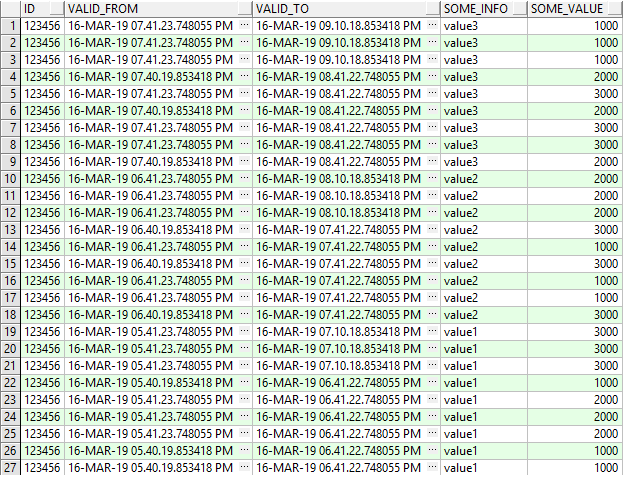
But joining the tables without specifying a given time is little bit tricky:

select a.id,
       least(a.valid_from, b.valid_from) valid_from,
       greatest(a.valid_to, b.valid_to) valid_to,
       a.some_info,
       b.some_value
  from tbl_a a
  join dim_1 b
    on a.dim_1_id = b.id
   and greatest(a.valid_from, b.valid_from) < least(a.valid_to, b.valid_to)
 order by 3 desc
Join result without specifying a time (all versions change across both tables)

You can use the same to join several tables.

Records Versioning in an SQL table: Removing duplicates

It happens that one want to protocol all changes of records of a table in the same table. This by using two timestamp columns „valid_from“ and „valid_to“. So that there is always exactly one version of a record for a given time.

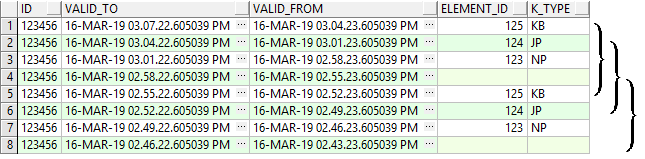
As part of a data migration in a project, I was faced with a situation that I have different versions that have the same content. Let me illustrate this with an example:

create table tbl_a (
                      id number
                      ,valid_from timestamp(6)
                      ,valid_to timestamp(6)
                      ,element_id number
                      ,k_type varchar2(10)
);

Fill the table with few columns

insert into tbl_a 
select 123456 id,
       systimestamp + numtodsinterval(1, 'SECOND') +
       numtodsinterval(rownum - 1, 'MINUTE') valid_from,
       systimestamp + numtodsinterval(rownum, 'MINUTE') valid_to,
       case   when mod(rownum,12) in (4,5,6) then 123 when mod(rownum,12) in (7,8,9) then 124
                 when mod(rownum,12) in (10,11,0) then 125  else null end element_id, 
               case   when mod(rownum,12) in (4,5,6) then 'NP' when mod(rownum,12) in (7,8,9) then 'JP'
                 when mod(rownum,12) in (10,11,0) then 'KB'  else null end k_type
          from dual
        connect by level < 25;
commit;
select * from tbl_a order by valid_from desc

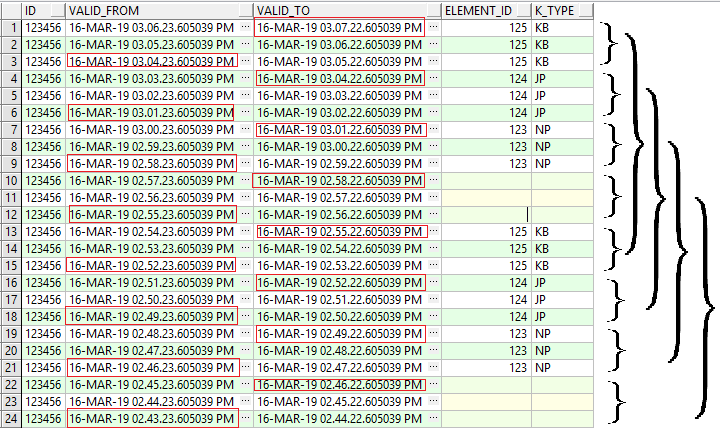
In this example, we see that we have six versions of each record.
But only two versions, correspond to a real change. So the goal is to remove the non-real changes to each record and the values of „valid_from“ and „valid_to“ need not have a gap. The right „valid_from“ and „valid_to“ are marked in red.

Duplicates are removed
with the right version Begin and end

This can be achieved with the following SQL:

SELECT id,
       MAX(valid_to) valid_to,
       MIN(valid_from) valid_from,
       element_id,
       k_type
  FROM (SELECT id,
               valid_to,
               valid_from,
               element_id,
               k_type,
               ROW_NUMBER() OVER(PARTITION BY id ORDER BY valid_to) - ROW_NUMBER() OVER(PARTITION BY id, element_id, k_type ORDER BY valid_to) rrr
          FROM (SELECT id,
                       valid_to,
                       valid_from,
                       element_id,
                       k_type,
                       LEAD(k_type || element_id, 1, 'x') OVER(PARTITION BY id ORDER BY valid_to) R,
                       LAG(k_type || element_id, 1, 'x') OVER(PARTITION BY id ORDER BY valid_to) RR
                  FROM tbl_a T
                 ORDER BY valid_to) S
         WHERE (NVL(R, 'y') <> NVL(RR, 'y') OR
               NVL(r, 'y') <> NVL(k_type || element_id, 'y'))) Q
 GROUP BY id, element_id, k_type, rrr
 order by 3 desc

That was just an example. In my case, the table consisted of several dozens of columns and has several millions of records.
You can use pl sql to dynamically generate this SQL for a general case.

PL/SQL Code Quality: How to implement your own code metrics

For a better code quality you have to collect and evaluate statistics and information about the code: The code must conform to best practices as well as in-house rules.

I have developed a method that collects and evaluates such information: For example detecting superfluous code, interleaved function definitions, checking whether the right data type is used, etc.
It does not matter if packages or nested procedures are used. You can integrate the program with your build management tool and create a report on the fly. This way, you can measure the quality of your code at any time.

Please contact me if interested.