In some cases, data versioning is used at the record level. This is especially useful because you can version tables independently. You only need to version those records, that have changed, without changing dependent records from other tables. This by using two date columns in each table „version_from“ and „version_to“. So that there is always exactly one version of a record for a given time from each table. This reduces the memory space and the IOs.
Because in any given time there is at most only one version of a record per table, joining two tables in a given time is easy. However to join the tables independently for a given time (all changes across two tables) is little bit tricky. In this Blog I will show you how to do that.
For instance let’s create two tables „tbl_a“ and „dim_1“. The two tables should be joined using the columns tbl_a.dim_1_id and dim_1.id.
-- create table tbl_a
create table tbl_a (
                      id number
                      ,valid_from timestamp(6)
                      ,valid_to timestamp(6)
                      ,dim_1_id number
                      ,some_info varchar2(10)
);


--create table dim_1
create table dim_1 (
                      id number
                      ,valid_from timestamp(6)
                      ,valid_to timestamp(6)
                      ,some_value number
);
Let’s generate some data:
insert into tbl_a
select 123456 id,
               systimestamp + numtodsinterval(1, 'SECOND') +
               numtodsinterval(rownum - 1, 'HOUR') valid_from,
               systimestamp + numtodsinterval(rownum, 'HOUR') valid_to,
               123 dim_1_id,
               decode(mod(rownum,3),1,'value1',2,'value2','value3') some_value

          from dual connect by level < 4
union all
select 123456 id,
               systimestamp + numtodsinterval(1, 'SECOND') +
               numtodsinterval(rownum - 1, 'HOUR') valid_from,
               systimestamp + numtodsinterval(rownum, 'HOUR') valid_to,
               124 dim_1_id,
               decode(mod(rownum,3),1,'value1',2,'value2','value3') some_value

          from dual connect by level < 4
union all
select 123456 id,
               systimestamp + numtodsinterval(1, 'SECOND') +
               numtodsinterval(rownum - 1, 'HOUR') valid_from,
               systimestamp + numtodsinterval(rownum, 'HOUR') valid_to,
               125 dim_1_id,
               decode(mod(rownum,3),1,'value1',2,'value2','value3') some_value

          from dual connect by level < 4
;
commit;
select * from tbl_a order by valid_to desc select * from dim_1 order by id,valid_to des
Joining the tables at given a time is straightforward
select *
  from tbl_a a
  join dim_1 b
    on a.dim_1_id = b.id
   and to_timestamp('16.03.2019 18:42:00', 'dd.mm.yyyy hh24:mi:ss') between
       a.valid_from and a.valid_to
   and to_timestamp('16.03.2019 18:42:00', 'dd.mm.yyyy hh24:mi:ss') between
       b.valid_from and b.valid_to
join result at to_timestamp(‚16.03.2019 18:42:00‘, ‚dd.mm.yyyy hh24:mi:ss‘)
But joining the tables without specifying a given time is little bit tricky:
select a.id,
       least(a.valid_from, b.valid_from) valid_from,
       greatest(a.valid_to, b.valid_to) valid_to,
       a.some_info,
       b.some_value
  from tbl_a a
  join dim_1 b
    on a.dim_1_id = b.id
   and greatest(a.valid_from, b.valid_from) < least(a.valid_to, b.valid_to)
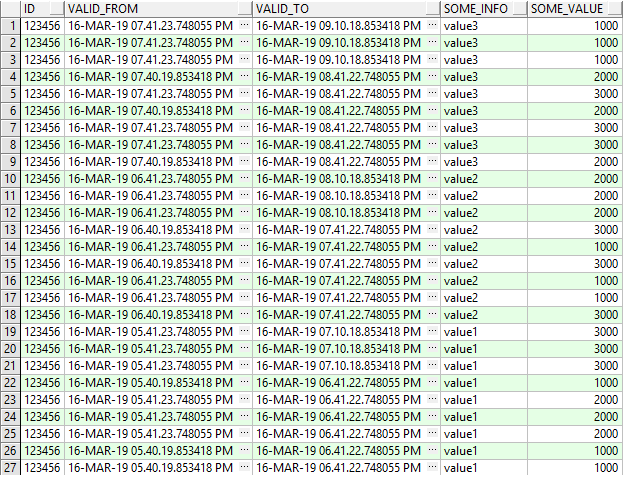
 order by 3 desc
Join result without specifying a time (all versions change across both tables)
It happens that one want to protocol all changes of records of a table in the same table. This by using two timestamp columns „valid_from“ and „valid_to“. So that there is always exactly one version of a record for a given time.
As part of a data migration in a project, I was faced with a situation that I have different versions that have the same content. Let me illustrate this with an example:
create table tbl_a (
                      id number
                      ,valid_from timestamp(6)
                      ,valid_to timestamp(6)
                      ,element_id number
                      ,k_type varchar2(10)
);
Fill the table with few columns
insert into tbl_a
select 123456 id,
       systimestamp + numtodsinterval(1, 'SECOND') +
       numtodsinterval(rownum - 1, 'MINUTE') valid_from,
       systimestamp + numtodsinterval(rownum, 'MINUTE') valid_to,
       case   when mod(rownum,12) in (4,5,6) then 123 when mod(rownum,12) in (7,8,9) then 124
                 when mod(rownum,12) in (10,11,0) then 125  else null end element_id,
               case   when mod(rownum,12) in (4,5,6) then 'NP' when mod(rownum,12) in (7,8,9) then 'JP'
                 when mod(rownum,12) in (10,11,0) then 'KB'  else null end k_type
          from dual
        connect by level < 25;
commit;
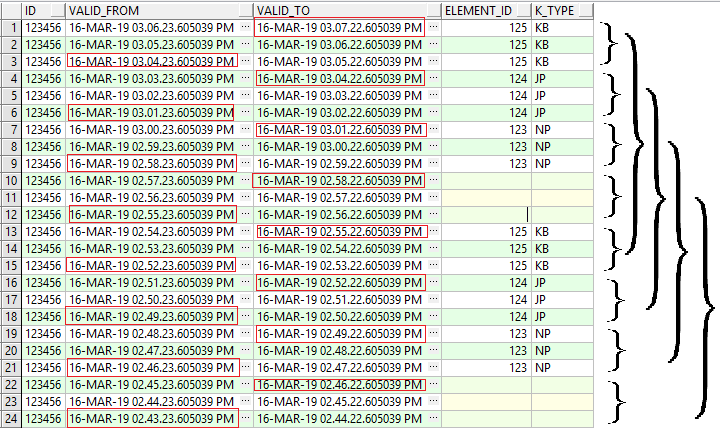
select * from tbl_a order by valid_from desc
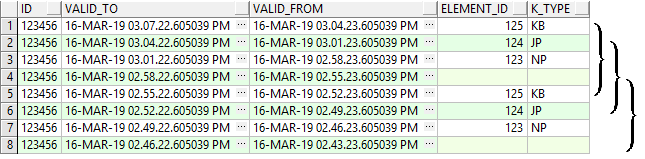
In this example, we see that we have six versions of each record. But only two versions, correspond to a real change. So the goal is to remove the non-real changes to each record and the values of „valid_from“ and „valid_to“ need not have a gap. The right „valid_from“ and „valid_to“ are marked in red.
Duplicates are removed with the right version Begin and end
This can be achieved with the following SQL:
SELECT id,
       MAX(valid_to) valid_to,
       MIN(valid_from) valid_from,
       element_id,
       k_type
  FROM (SELECT id,
               valid_to,
               valid_from,
               element_id,
               k_type,
               ROW_NUMBER() OVER(PARTITION BY id ORDER BY valid_to) - ROW_NUMBER() OVER(PARTITION BY id, element_id, k_type ORDER BY valid_to) rrr
          FROM (SELECT id,
                       valid_to,
                       valid_from,
                       element_id,
                       k_type,
                       LEAD(k_type || element_id, 1, 'x') OVER(PARTITION BY id ORDER BY valid_to) R,
                       LAG(k_type || element_id, 1, 'x') OVER(PARTITION BY id ORDER BY valid_to) RR
                  FROM tbl_a T
                 ORDER BY valid_to) S
         WHERE (NVL(R, 'y') <> NVL(RR, 'y') OR
               NVL(r, 'y') <> NVL(k_type || element_id, 'y'))) Q
 GROUP BY id, element_id, k_type, rrr
 order by 3 desc
That was just an example. In my case, the table consisted of several dozens of columns and has several millions of records. You can use pl sql to dynamically generate this SQL for a general case.
For a better code quality you have to collect and evaluate statistics and information about the code: The code must conform to best practices as well as in-house rules.
I have developed a method that collects and evaluates such information: For example detecting superfluous code, interleaved function definitions, checking whether the right data type is used, etc. It does not matter if packages or nested procedures are used. You can integrate the program with your build management tool and create a report on the fly. This way, you can measure the quality of your code at any time.
Today I want to show you how I analyse the referential integrity in Oracle. First only for one level and then using an SQL to find the entire hierarchy leading up to a specific table. Certainly you can do this using tools, but here only SQL is used.
The referential integrity in Oracle is ensured by using foreign keys. As an an example we create three tables parent_tbl, child_tbl1 and child_tbl2. Both child_tbl1 and child_tbl2 tables have foreign keys pointing on parent_tbl table.
With the following statement we find the tables that have foreign keys pointing on the parent_tbl table.
SELECT A.OWNER,
       A.TABLE_NAME,
       A.CONSTRAINT_NAME,
       A.R_CONSTRAINT_NAME,
       A.CONSTRAINT_TYPE
  FROM USER_CONSTRAINTS A
  JOIN USER_CONSTRAINTS B
    ON A.OWNER = B.OWNER
   AND A.R_CONSTRAINT_NAME = B.CONSTRAINT_NAME
 WHERE B.TABLE_NAME = 'PARENT_TBL'
   AND A.CONSTRAINT_TYPE = 'R'
 OWNER TABLE_NAME CONSTRAINT_NAME R_CONSTRAINT_NAME CONSTRAINT_TYPE
 1 TESTER CHILD_TBL2 FK_CHILD_TBL2 PK_PARENT_TBL R
 2 TESTER CHILD_TBL1 FK_CHILD_TBL1 PK_PARENT_TBL R
If you are interested to know also the columns involved in the foreign key relationship:
WITH CONS AS
 (SELECT A.OWNER,
         A.TABLE_NAME,
         A.CONSTRAINT_NAME,
         A.R_CONSTRAINT_NAME,
         B.TABLE_NAME R_TABLE_NAME,
         A.CONSTRAINT_TYPE
    FROM USER_CONSTRAINTS A
    JOIN USER_CONSTRAINTS B
      ON A.OWNER = B.OWNER
     AND A.R_CONSTRAINT_NAME = B.CONSTRAINT_NAME
   WHERE B.TABLE_NAME = 'PARENT_TBL'
     AND A.CONSTRAINT_TYPE = 'R')
SELECT A.*, B.COLUMN_NAME, B.POSITION
  FROM CONS A
  JOIN USER_CONS_COLUMNS B
    ON A.OWNER = B.OWNER
   AND A.TABLE_NAME = B.TABLE_NAME
   AND A.CONSTRAINT_NAME = B.CONSTRAINT_NAME
 OWNER TABLE_NAME CONSTRAINT_NAME R_CONSTRAINT_NAME R_TABLE_NAME CONSTRAINT_TYPE COLUMN_NAME POSITION
 1 TESTER CHILD_TBL1 FK_CHILD_TBL1 PK_PARENT_TBL PARENT_TBL R PARENT_TBL_ID2 2
 2 TESTER CHILD_TBL1 FK_CHILD_TBL1 PK_PARENT_TBL PARENT_TBL R PARENT_TBL_ID 1
 3 TESTER CHILD_TBL2 FK_CHILD_TBL2 PK_PARENT_TBL PARENT_TBL R PARENT_TBL_ID2 2
 4 TESTER CHILD_TBL2 FK_CHILD_TBL2 PK_PARENT_TBL PARENT_TBL R PARENT_TBL_ID 1
The following statement return only one row per table. (so you can use it directly to generate ddl for the fk)
WITH CONS AS
 (SELECT A.OWNER,
         A.TABLE_NAME,
         A.CONSTRAINT_NAME,
         B.TABLE_NAME R_TABLE_NAME,
         A.R_CONSTRAINT_NAME,
         A.CONSTRAINT_TYPE
    FROM USER_CONSTRAINTS A
    JOIN USER_CONSTRAINTS B
      ON A.OWNER = B.OWNER
     AND A.R_CONSTRAINT_NAME = B.CONSTRAINT_NAME
   WHERE B.TABLE_NAME = 'PARENT_TBL'
     AND A.CONSTRAINT_TYPE = 'R'),
CONS_R_COL AS
 (SELECT A.*, B.COLUMN_NAME, B.POSITION
    FROM CONS A
    JOIN USER_CONS_COLUMNS B
      ON A.OWNER = B.OWNER
     AND A.TABLE_NAME = B.TABLE_NAME
     AND A.CONSTRAINT_NAME = B.CONSTRAINT_NAME),
INFO_V AS
 (SELECT RC.OWNER,
         RC.TABLE_NAME,
         RC.CONSTRAINT_NAME,
         RC.COLUMN_NAME,
         RC.R_TABLE_NAME,
         RC.R_CONSTRAINT_NAME,
         RP.COLUMN_NAME R_COLUMN_NAME,
         RC.POSITION
    FROM CONS_R_COL RC
    JOIN USER_CONS_COLUMNS RP
      ON RC.OWNER = RP.OWNER
     AND RC.R_TABLE_NAME = RP.TABLE_NAME
     AND RC.POSITION = RP.POSITION)
SELECT OWNER,
       TABLE_NAME,
       CONSTRAINT_NAME,
       LISTAGG(COLUMN_NAME, ',') WITHIN GROUP(ORDER BY POSITION) COLS,
       R_TABLE_NAME,
       R_CONSTRAINT_NAME,
       LISTAGG(R_COLUMN_NAME, ',') WITHIN GROUP(ORDER BY POSITION) R_COLS
  FROM INFO_V
 GROUP BY OWNER,
          TABLE_NAME,
          CONSTRAINT_NAME,
          R_TABLE_NAME,
          R_CONSTRAINT_NAME
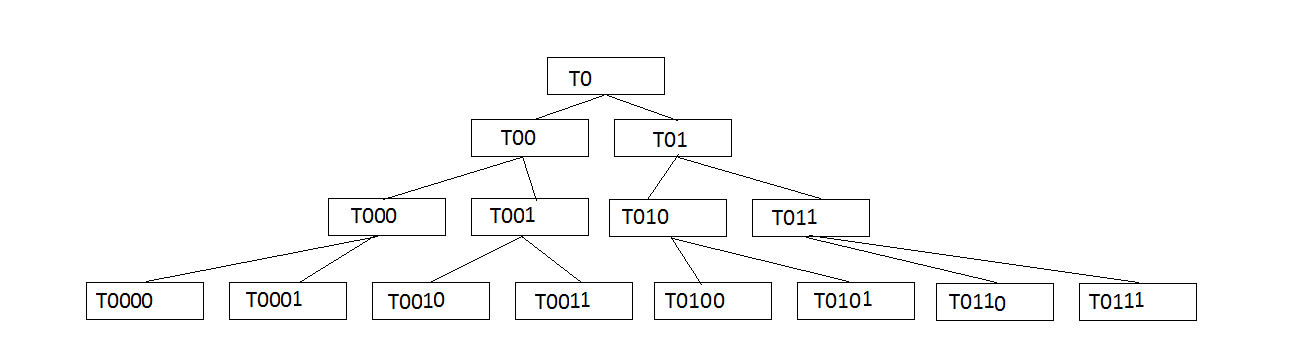
So far so good. But what can be interesting is to find the whole hierarchy leading up to a table. Let’s create a few tables that make up a binary tree. Starting from the table T0. This has two child tables, each one with two child tables. We stop at level 3. in total we have 15 tables. With the following block you can first visualize this tree.
DECLARE
  lvl BINARY_INTEGER := 0;
  deep BINARY_INTEGER := 2;
  procedure LOG(msg VARCHAR2,n binary_integer DEFAULT 0) IS
  BEGIN
    dbms_output.put_line(rpad(' ' ,n*2)||msg);
  END;
  PROCEDURE cre_childs(parent_tbl VARCHAR2, l binary_integer) IS
  BEGIN
    FOR j IN 0..1 LOOP
      LOG(parent_tbl||j,l);
      IF l <= deep THEN
        cre_childs(parent_tbl ||j,l+1);
      END IF;
    END LOOP;
  END;
BEGIN
  LOG('T0');
  cre_childs('T0',1);
END;
With the following statement you get the whole hierarchy leading up to the table T0:
WITH  core AS
       (SELECT b.table_name      tbl_parent,
                 a.TABLE_NAME      tbl_child,
                 b.constraint_name constraint_parent,
                 a.CONSTRAINT_NAME constraint_child
            FROM user_constraints a
            JOIN user_constraints b
              ON a.R_CONSTRAINT_NAME = b.CONSTRAINT_NAME
           WHERE a.CONSTRAINT_TYPE = 'R'),
       tbl0 AS
       (SELECT tbl_parent,
               tbl_child,
               level              l,
               connect_by_iscycle iscycl,
               constraint_parent,
               constraint_child
          FROM core
           START WITH tbl_parent = 'T0' ------ Root table
         CONNECT BY NOCYCLE PRIOR tbl_child = tbl_parent),
        tbl AS
        (SELECT tbl_parent,
               tbl_child,
               MAX(iscycl) iscycl,
               constraint_parent,
               constraint_child,
               l
          FROM tbl0
         GROUP BY tbl_parent,tbl_child,constraint_parent,constraint_child,l),
        tbl2 as
        (SELECT tbl_parent, tbl_child,  constraint_parent, constraint_child,0 iscycl, l level_
         FROM tbl
         UNION all
        SELECT tbl.tbl_child, tbl.tbl_child,  core.constraint_parent, core.constraint_child,1, l level_
          FROM tbl
          JOIN core
            ON tbl.tbl_child = core.tbl_parent and tbl.tbl_child = core.tbl_child
         WHERE iscycl = 1
           AND core.constraint_parent <> tbl.constraint_parent),
          tmp as
       (SELECT tbl_parent table_name, constraint_parent constraint_name,iscycl
          FROM tbl2
         UNION
        SELECT tbl_child, constraint_child,iscycl FROM tbl2),
        tmp2 as
       (SELECT c.table_name, c.constraint_name, c.column_name, position,iscycl
          FROM (select table_name,constraint_name,column_name,position from  user_cons_columns
                 ) c
          JOIN tmp
            ON c.table_name = tmp.table_name
           AND c.constraint_name = tmp.constraint_name),
          tmp3 as
       (SELECT table_name,
         constraint_name,
         listagg(column_name,',') WITHIN GROUP(ORDER BY position) cols,
         MAX(iscycl) iscycl
        FROM tmp2
       GROUP BY table_name, constraint_name)-- main select
       SELECT distinct tbl2.iscycl,tbl2.tbl_parent,tbl2.tbl_child,p_col.cols p_cols , c_col.cols c_cols ,level_
    FROM tbl2
    JOIN tmp3 p_col
      ON tbl2.tbl_parent = p_col.table_name
     AND tbl2.constraint_parent = p_col.constraint_name
    JOIN tmp3 c_col
      ON tbl2.tbl_child = c_col.table_name
     AND tbl2.constraint_child = c_col.constraint_name
   order by level_,tbl2.iscycl DESC
Today I would like to talk about how I generate dynamically a code to export a table or a query result as XML file using XMLTYPE.
In many situations I need to save a table or query result as XML-file in order to use the file as configuration for my application or to use it in other program (Java, C#, …). To achieve this I wrote the following PL/SQL Block:
declare
  -- table or view to export
  v_tbl_name varchar2(30) := 'MYTABLE';
  v_stmt varchar2(32767);
  --the table will be saved in this variable
  v_output_as_xmltype XMLTYPE;
  function fu_format(p_name varchar2, p_type varchar2) return varchar2 is
    ret varchar2(200);
  begin
    --on can add e.g formating for timestamp...
    ret := case when p_type = 'DATE' then 'to_char('||p_name||',''dd.mm.yyyy'')' else p_name end;
    return lpad(' ',15) || ret;
  end fu_format;
begin
  for rec in (select column_name,data_type from user_tab_cols where table_name = v_tbl_name order by column_id) loop
    v_stmt := v_stmt || fu_format(rec.column_name,rec.data_type) || ' as ' || rec.column_name || ',' || chr(10);
  end loop;
  v_stmt := 'SELECT XMLELEMENT("'||v_tbl_name||'",' || chr(10) ||
           'XMLAGG( ' || chr(10) ||
           '  XMLELEMENT("row", ' || chr(10) ||
           '    XMLFOREST( ' || chr(10) ||
           rtrim(v_stmt,','||chr(10)) || chr(10) ||
           '    ) ' || chr(10) ||
           '  ) ' || chr(10) ||
           ') ' || chr(10) ||
           ') FROM ' || v_tbl_name
         ;
  -- this is the statement
  dbms_output.put_line(v_stmt);
  execute immediate v_stmt into v_output_as_xmltype;
  --one can save the v_output_as_xmltype in a file
  -- or just insert it in a table
  -- ddl for the xml_output_table
  --create table xml_output_table(id number,content xmltype);
  INSERT INTO xml_output_table VALUES (1, v_output_as_xmltype);
  COMMIT;
end;
Let create a table to test this block:
create table mytable(
                     id number
                    ,col1 varchar2(50)
                    ,col2 varchar2(50)
                    ,col3 varchar2(50)
                    ,created_at date
                );
insert into mytable select   rownum
                          ,'col1_'||rownum
                          ,'col2_'||rownum
                          ,'col3_'||rownum
                          ,sysdate-rownum
                     from dual connect by level < 4;
3 rows inserted.
commit;
One have only to set the table (or view) name in the block above to generate following code:
SELECT XMLELEMENT("MYTABLE1",
XMLAGG(
  XMLELEMENT("row",
    XMLFOREST(
               ID as ID,
               COL1 as COL1,
               COL2 as COL2,
               COL3 as COL3,
               to_char(CREATED_AT,'dd.mm.yyyy') as CREATED_AT
    )
  )
)
) FROM MYTABLE
But what if you want to export a select statement with where clause instead of a table or a view? One possibility would be to create a view with the statement. An elegant way is to use the „dbms_sql“ package. With it you can get all necessary information about the statement (column name and type) to generate the SQL.
For example: select id,col1 from mytable where id < 5.
declare
  -- Statement
  v_query varchar2(32767) := 'select id,col1 from MYTABLE where id < 5';
  v_stmt varchar2(32767);
  v_output_as_xmltype XMLTYPE;
  v_cursor_id integer;
  v_col_cnt integer;
  v_columns dbms_sql.desc_tab;

  function fu_format(p_name varchar2, p_type number) return varchar2 is
    ret varchar2(200);
  begin
    ret := case when p_type = dbms_types.TYPECODE_DATE  then 'to_char('||p_name||',''dd.mm.yyyy'')' else p_name end;
    return lpad(' ',15) || ret;
  end fu_format;
begin
  v_cursor_id := dbms_sql.open_cursor;
  dbms_sql.parse(v_cursor_id, v_query, dbms_sql.native);
  dbms_sql.describe_columns(v_cursor_id, v_col_cnt, v_columns);

  for i in 1 .. v_columns.count loop
    v_stmt := v_stmt || fu_format(v_columns(i).col_name,v_columns(i).col_type) || ' as ' || v_columns(i).col_name || ',' || chr(10);
  end loop;
    dbms_sql.close_cursor(v_cursor_id);
    v_stmt := 'SELECT XMLELEMENT("query",' || chr(10) ||
           'XMLAGG( ' || chr(10) ||
           '  XMLELEMENT("row", ' || chr(10) ||
           '    XMLFOREST( ' || chr(10) ||
           rtrim(v_stmt,','||chr(10)) || chr(10) ||
           '    ) ' || chr(10) ||
           '  ) ' || chr(10) ||
           ') ' || chr(10) ||
           ') text FROM ( ' || v_query || ' )'
         ;
  dbms_output.put_line(v_stmt);
  --execute immediate v_stmt into v_output_as_xmltype;
  --INSERT INTO xml_tab VALUES (1, v_output_as_xmltype);
  --COMMIT;

end;
This will generate this statement:
SELECT XMLELEMENT("query",
XMLAGG(
  XMLELEMENT("row",
    XMLFOREST(
               ID as ID,
               COL1 as COL1
    )
  )
)
) text FROM ( select id,col1 from MYTABLE where id < 5 )
Today I want to report about my experience with the error ORA-54032: column to be renamed is used in a virtual column expression.
We developed new features in our software. The new features should be released for both oracle version 11.2.0.4 and 12.1.0.2. After successfully testing the upgrade on 11.2.0.4 oracle version, we got however on 12.1.0.2 following error: ORA-54032: column to be renamed is used in a virtual column expression.
We had just tested it on 11.2.0.4 and everything was ok. The error confused me because in fact in one place I defined virtual column and renamed other columns. Then I thought that I didn’t respect the order by renaming and defining the new columns. And perhaps I did mistake by testing on 11.2.0.4. I checked the test routine again and after a code review, I found that everything was ok. Then I got the suspicion that maybe we have an Oracle bug here. I’ve read before that there are problems in 12.1 because of extended statistics:
Extended statistics were introduced in Oracle 11g to allow statistics to be gathered on groups of columns, to highlight the relationship between them, or on expressions. Oracle 11gR2 makes the process of gathering extended statistics for column groups easier.
Then I checked with the following query, which virtual column is there in the target table:
SELECT column_name,hidden_column FROM user_tab_cols WHERE table_name = 'MYTABLE'
Then the surprise: In the result I found this oddly column: SYS_STSQZJ#5GML0JJ$YE3F3U#_SN1 YES
In fact there is a virtual column and moreover hidden! But I did not create any one.
By the name sounds that it was created by oracle, so it was surely created because of the extended statistics.
I have no problem with that if its purpose to improve the performance, but why does it trigger an error when trying to rename my own columns? I did not even create this column and I do not even know if it exits! Could not oracle make sure to separate its internal optimizations from our logic? One can not even remove those virtual column with a drop.
ALTER TABLE mytable DROP COLUMN SYS_STSQZJ#5GML0JJ$YE3F3U#_SN1;
one get this erros: ORA-12996: cannot drop system-generated virtual column
Well, then I had to watch how I just get my code up and running:
I researched and found the following way.
BEGIN
FOR i IN (SELECT extension_name, extension
FROM user_stat_extensions
WHERE table_name = UPPER('MYTABLE')-- your table
AND extension_name LIKE 'SYS_STS%' -- SYS_STS are system generated from the DECODE in ALL_STAT_EXTENSIONS
) LOOP
DBMS_OUTPUT.PUT_LINE('-- Dropping extension on '||i.extension);
DBMS_OUTPUT.PUT_LINE('exec DBMS_STATS.DROP_EXTENDED_STATS(user, ''&¤t_table.'', '''||i.extension||''');');
END LOOP;
END;
Today I want to briefly talk about my experience with the login as a sys user. A strange story.
A colleague called me and said that suddenly he can not log in to a pluggable database as a Sys user. It was a 12.1.0.2 Oracle Database. For me something should be because of the fact that the Listner is not started or the password file does not exist or a firewall problem. But the colleague confirmed to me that he can log in remotely with system user and that password file exists. Then I told him to rebuild the password file, maybe the file was just corrupt. Rebuilding the file also did not help. That confused me…..
Rebuilding the file also did not help. That confused me…..
Then I told him to create a dummy user and grant him sysdba role. Sys user can only log in as sysdba (or sysoper or sys..) and those users have the particuliarity of having their passwords in the database as well as in the password file on the Oracle Instance. (If one want to log in remotely. The instance does not have to be started, so the password file is needed).
create user dummy identified by dummy; grant create session to dummy; grant sysdba to dummy;
amazing he could log in as dummy user but not as sys. As sys he gets the following error message:
I was confused again. What can the problem be here? Can it be that Sys password is not in the password file?! That’s not allowed to be true. Then I asked him to look in the view v$pwfile_users: select * from v$pwfile_users;
And then came the big surprise. In fact Sys User is not in it. How can something like that happen?! Sys user has sysdba role!
Then … That sounds crazy, I told him to log in as sys user with OS permission and then give sysdba to sys user
sqlplus / as sysdba grant sysdba to sys;
Then again sys user was found in the view and one could log in remotely as sys with sysdba!
I think it’s strange when you can revoke sysdba role from sys user. Well, I think you can not revoke it. This role has I guess special handling in oracle database. Otherwise one would not have been able to log in with Os permissions. I believe that „revoke“ only affects the Password File.
I was so busy I did not properly investigate this case. When I had little time again and want to reproduce the problem, I get the following error message when I try to revoke sysdba from sys:
ORA-01998: REVOKE failed: user SYS always has SYSOPER and SYSDBA
Here’s my experience with a performance problem in the Oracle database. After several months of work on a product and after successful tests, it was time to carry out the integration tests at the customer. Now the customer has noticed that the GUI (JAVA) is quite slow in some situations.
What happened then?! Everything works for us perfect. What is special about the customer? Now I was assigned to analyze the problem.
The first thing I did was to look in our application log and to compare it with the logs in our UAT environment. Surprisingly, the suspicious SQL was easy to find. It was a simple SQL. It should return at most dozens of records and is finished in our UAT environmentin in one second. But by the customer takes more than a minute. The Statement should be called several times, each time it takes more than a minute. This of course makes the GUI very slow.
The SQL ist:
WITH CFG_TBL_AS AS
   (SELECT
     OWNER, TABLE_NAME, COLUMN_NAME, FUNCTION_NAME, TABLE_NAME_NEW
      FROM TMP_$_ANONY$CONFIG$
     WHERE TABLE_NAME_NEW IS NOT NULL)
  SELECT A.TABLE_NAME, A.COLUMN_NAME, B.TABLE_NAME_NEW, B.FUNCTION_NAME
    FROM ALL_TAB_COLS A
    LEFT JOIN CFG_TBL_AS B
      ON A.OWNER = B.OWNER
     AND A.TABLE_NAME = B.TABLE_NAME
     AND A.COLUMN_NAME = B.COLUMN_NAME
   WHERE (A.OWNER, A.TABLE_NAME) IN
         (SELECT OWNER, TABLE_NAME FROM CFG_TBL_AS)
   ORDER BY A.TABLE_NAME, A.COLUMN_ID
looks easy. I get the Execute Plan from the Customer. I will only show the important here. (which is actually the problem)
It looks like oracle is trying to materialize a subquery. (A powrful feature of With Clause is materializing subqueries) In our environment the execute plan looks like this
Then I tried the SQL with the materialize hint and as expected I get the same execute paln and it takes also more than one minutes.
WITH CFG_TBL_AS AS
   (SELECT --+materialize
     OWNER, TABLE_NAME, COLUMN_NAME, FUNCTION_NAME, TABLE_NAME_NEW
      FROM TMP_$_ANONY$CONFIG$
     WHERE TABLE_NAME_NEW IS NOT NULL)
  SELECT A.TABLE_NAME, A.COLUMN_NAME, B.TABLE_NAME_NEW, B.FUNCTION_NAME
    FROM ALL_TAB_COLS A
    LEFT JOIN CFG_TBL_AS B
      ON A.OWNER = B.OWNER
     AND A.TABLE_NAME = B.TABLE_NAME
     AND A.COLUMN_NAME = B.COLUMN_NAME
   WHERE (A.OWNER, A.TABLE_NAME) IN
         (SELECT OWNER, TABLE_NAME FROM CFG_TBL_AS)
   ORDER BY A.TABLE_NAME, A.COLUMN_ID
Why is it even trying to materialize a few records (which fit into a single block)? And why should something take forever? But the important question for me was why does the statement behave as if the hint is inline?
This is because of the hidden system parameter: _with_subquery. It turns out that this is set to inline on our UAT environment!
ALTER SYSTEM SET "_with_subquery" = INLINE;
Someone forgot to remove this parameter, so we could not spot this issue before delivery. After adding the hint everythings work fine.
The following block should provide the commands to disable the foreign keys pointing on a table. It works wonderfully in 11.2.0.4 and 12.1.0.2 but not on 12.2.0.1. Does not trigger an error but also no results. You can test it, just replace ‚MYTABLE‘ with a table that has foreign key pointing on it.
DECLARE
  -- table that has Foreignkey pointing on it
  v_tbl_name VARCHAR2(30) := 'MYTABLE';
CURSOR get_massdata_tableinfo
    IS
      SELECT v_tbl_name table_name FROM dual

    ;
    CURSOR get_fks(par_target_table user_tables.table_name%TYPE)
    IS
      WITH
      user_constr AS
      (
        SELECT *
         FROM all_constraints
         WHERE owner = sys_context('USERENV', 'CURRENT_SCHEMA')
      )
      SELECT r.constraint_name,
             r.table_name
       FROM user_constr r,
            user_constr t
       WHERE t.table_name = par_target_table
         AND t.constraint_type = 'P'
         AND t.constraint_name = r.r_constraint_name
    ;
BEGIN
  FOR crec IN get_massdata_tableinfo
    LOOP
      --
      dbms_output.put_line('Table Name ' || crec.table_name);
      -- disable FK´s pointing to table
      FOR rec IN get_fks(crec.table_name) --no rows in 12.2.0.1 (but it works in 11.2.0.4 and 12.1.0.2)
      LOOP
        dbms_output.put_line('ALTER TABLE ' || rec.table_name ||
             ' DISABLE CONSTRAINT ' || rec.constraint_name);

      END LOOP;
    END LOOP;

END;
If I call the SQL directly, then I get records.
WITH
      user_constr AS
      (
        SELECT *
         FROM all_constraints
         WHERE owner = sys_context('USERENV', 'CURRENT_SCHEMA')
      )
      SELECT r.constraint_name,
             r.table_name
       FROM user_constr r,
            user_constr t
       WHERE t.table_name = 'MY_TABLE'
         AND t.constraint_type = 'P'
         AND t.constraint_name = r.r_constraint_name
Is this a bug ?
It looks like the problem is because of the oracle patch 22485591. It works in a 12.2.0.1 without this patch. In addition, a strange thing: When I add the hint no_merge to the following Statement it works also with the path 22485591.
 CURSOR get_fks(par_target_table user_tables.table_name%TYPE)
    IS
      WITH
      user_constr AS
      (
        SELECT /*+ no_merge */ * -- this is very strange
         FROM all_constraints
         WHERE owner = sys_context('USERENV', 'CURRENT_SCHEMA')
      )
      SELECT r.constraint_name,
             r.table_name
       FROM user_constr r,
            user_constr t
       WHERE t.table_name = par_target_table
         AND t.constraint_type = 'P'
         AND t.constraint_name = r.r_constraint_name
    ;
I posted the problem in freelists.org and I get this response from Jonathan Lewis:
—————————— — „deep dive“ —————————— Okay, I ran your test and got no output on 12.2.01 Traced it (10046 level 4) Found that the query against all_constraints went parallel and returned no data, so added a /*+ noparallel */ hint to the query, then (belts and braces) „alter session disable parallel query;“ Ran the test again – got the expected result. It looks like the parallel execution loses the value of sys_context. I would check whether 12.1.0.2 and 11.2.0.4 ran the query parallel or whether they ran it serially, and if they’re running t serially check what happens if you force it parallel.
—————– — After the no_merge comment: —————–
That (ed. the no_merge) may be luck rather than anything else. I just tried the same thing and still saw the problem (and parallel execution). In your case it’s possible that the presence of the no_merge hint resulted in Oracle materializing the subquery and maybe that made it run serially – i.e. it was about object_statistics rather than functionality.
P.S. Looking at the execution plans, my 12.2 (corrected from 12.1) is translating all_constraints to a query involving int$int$DBA_CONSTRAINTS, while the 12.1 query is a „more traditional“ massive join of lots of tables – so the base problem seems to start with the appearance of a CDB-mechanism of all_constraints. (I’m running 12.2. from a PDB, while the 12.1 is non-PDB database)
In this post I would like to briefly introduce how I dynamically generate a SQL to find diff of two tables. When optimizing a SQL Statement to get better performance, in most cases is not only enough to add (or remove) a few hints, but you have to rewrite the whole SQL statement. This is too risky and can cause the new statement to produce a very different result. That’s why you have to compare the results of both statements. One saves the result of the SQL before the optimization in a table e.g. table_a. And the result of SQL after optimization in the table Table_b. The difference is the result of the following SQL:
Select ‘table_a’ src,t.* from (Select * from table_a minus select * from table_b)
Union all
Select ‘table_b’ src,t.* from (Select * from table_b minus select * from table_a)
This will not work if the tables contain LOB objects. You can exclude the LOB objects from the comparison. But if they were quite relevant, you could use a hash function. The following PL / SQL block dynamically generates the Diff SQL and use the dbms_crypto.hash function:
DECLARE
tbl_a VARCHAR2(30):= 'TABLE_a';
tbl_b VARCHAR2(30):= 'TABLE_b';
cols VARCHAR2(32767);
stmt VARCHAR2(32767);

BEGIN
  FOR rec IN (SELECT * FROM user_tab_columns WHERE table_name = 'JURISTISCHE_PERSON' ORDER BY column_id) LOOP
    cols := cols || CASE WHEN rec.data_type IN ('CLOB','BLOB') THEN 'dbms_crypto.hash( utl_raw.cast_to_raw('||rec.column_name||'), 2) as ' || rec.column_name
    ELSE rec.column_name END||','||CHR(10);
  END LOOP;
  cols := rtrim(cols,','||CHR(10));
  stmt := 'select '''||tbl_a||''' src,t.* from (select '||cols|| ' from ' || tbl_a || ' minus select '||cols|| ' from ' || tbl_b||') t
           union all
           select '''||tbl_b||''',t.* from (select '||cols|| ' from ' || tbl_b || ' minus select '||cols|| ' from ' || tbl_a||') t';
  dbms_output.put_line(stmt);
END;





 Ahmed Fikri